Reclaim your time.
Eliminate distractions.

VOID is an Android app and website blocker that puts a 5-second pause before apps like Instagram or YouTube open. When you reach for your phone out of habit while studying or before bed, that short wait makes it easier to close the app and get back to what you were doing.
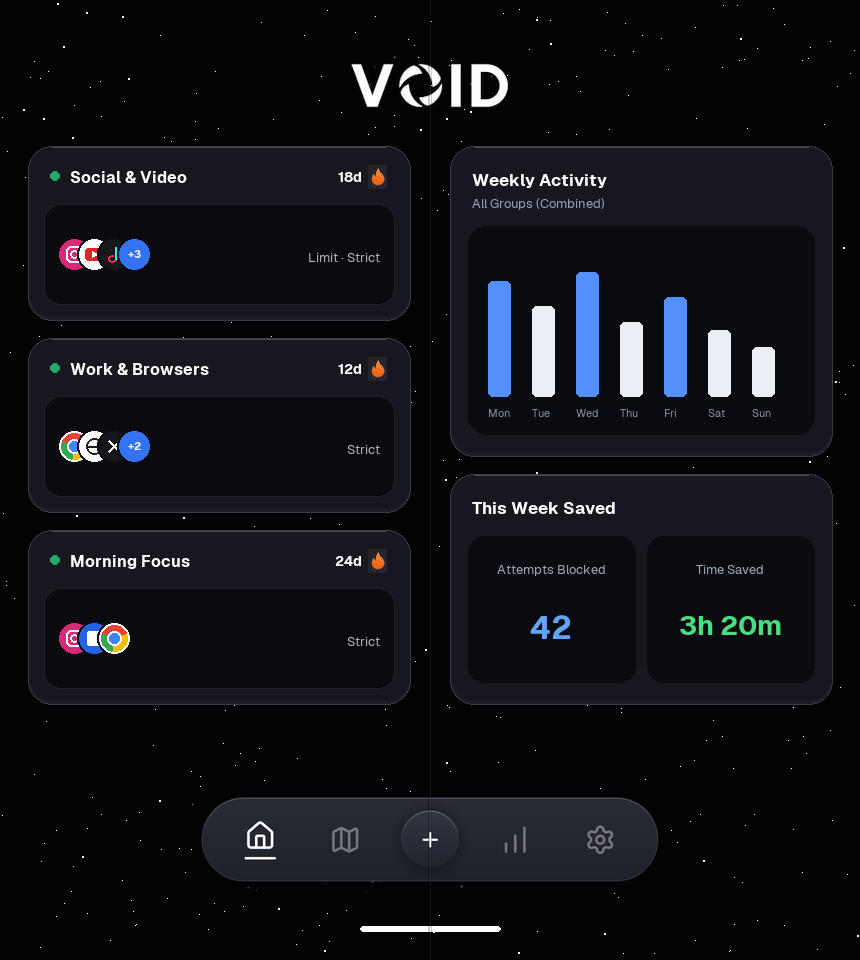
VOID Dashboard and Activity split view on an unfolded Android foldable
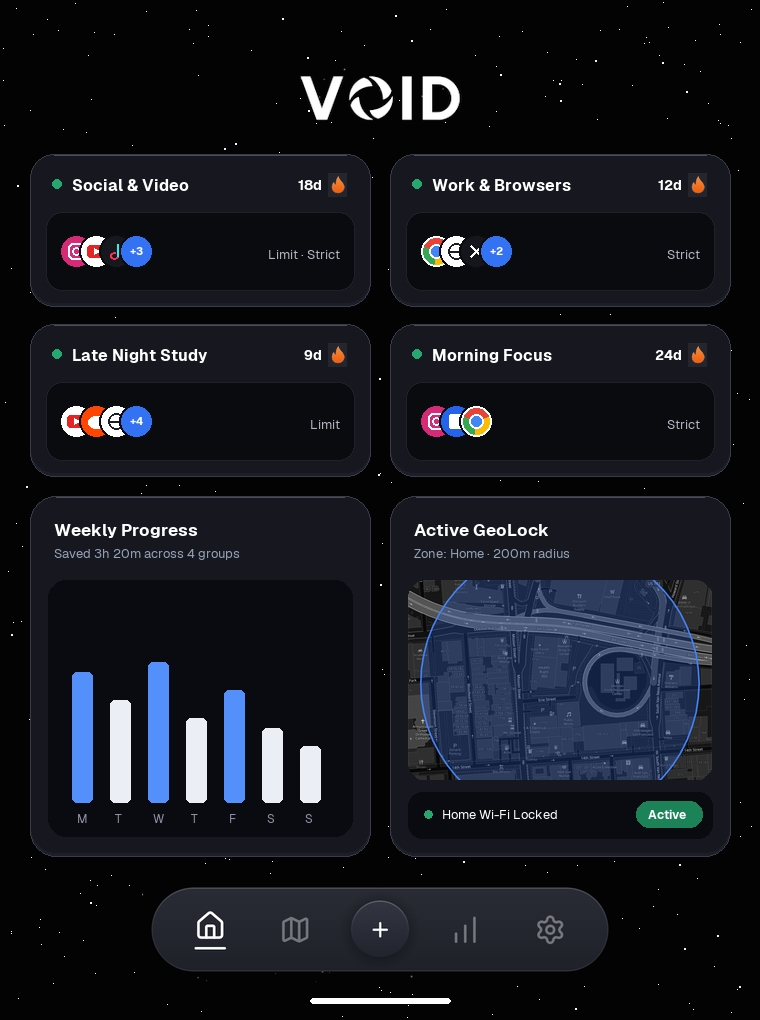
VOID multi-column Dashboard, Activity, and GeoLock view on an Android tablet
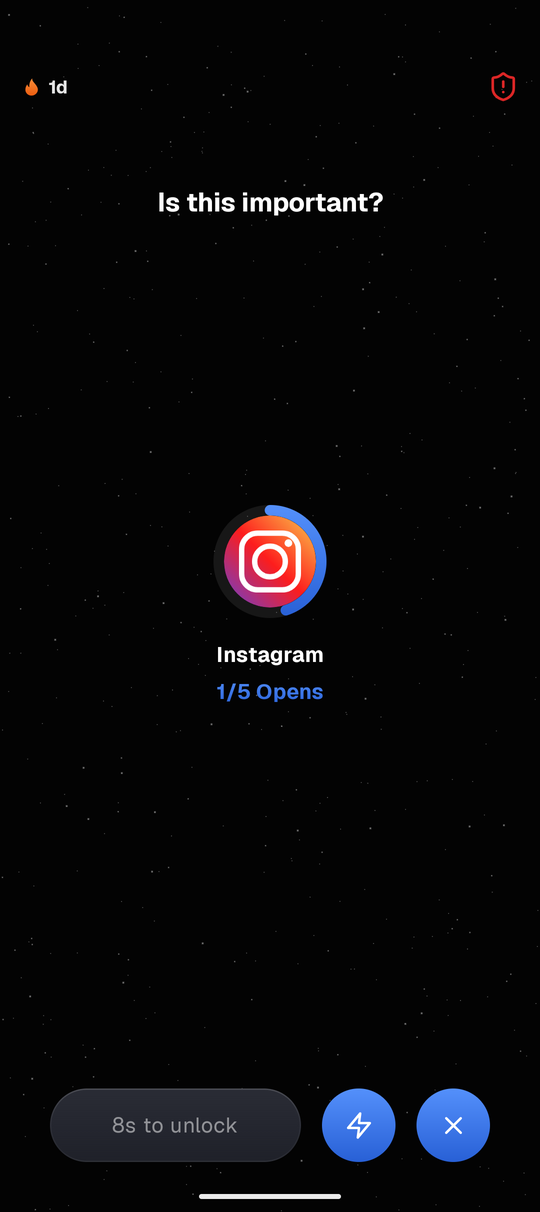
VOID live pause screen asking Is this important before Instagram opens

A short pause before your feed loads

Start with just one app that pulls you away from work or sleep. You pick the rule and how strict it is, without setting up complicated schedules right away.

1
Pick the apps you keep opening
Select social apps or websites you want to cut back on, or start with a simple daily limit.
2
VOID pauses before the app opens
Before the feed loads, a clean screen asks "Is this important?" and starts a quick countdown.
3
Open when needed, or close it
Need it for a message? Wait the countdown or tap Quick Open. Changed your mind? Close it in one tap.
VOID blocking pause screen asking Is this important before opening Instagram
Live Pause Screen on Android
Shown before a chosen app finishes loading

Tools that actually hold your limits

Start with a short pause, then add schedules, place rules, or settings locks as needed.

Blocks Both Apps & Websites

Group mobile apps and matching browser domains under one shared daily limit or schedule.

Limit
Strict
Apps & Sites
Access Time 5m
Daily Opens 5 opens · 5 minutes
Mindful Pause
Short wait timer
Wait before the app opens
Stillness Pause
Keep phone still
Hold phone flat & steady
Image Match
Take a matching photo
Match saved reference photo
Mindful Typing
Type a short sentence
"I open this with purpose|"

Choose Your Pause

Pick a simple countdown wait, stillness hold, saved photo match, or phrase typing challenge.

Locks by Place or Wi-Fi

Activate rules automatically inside map zones (30m to 1,500m) or on saved Wi-Fi networks.

Zone: Home 1 Group
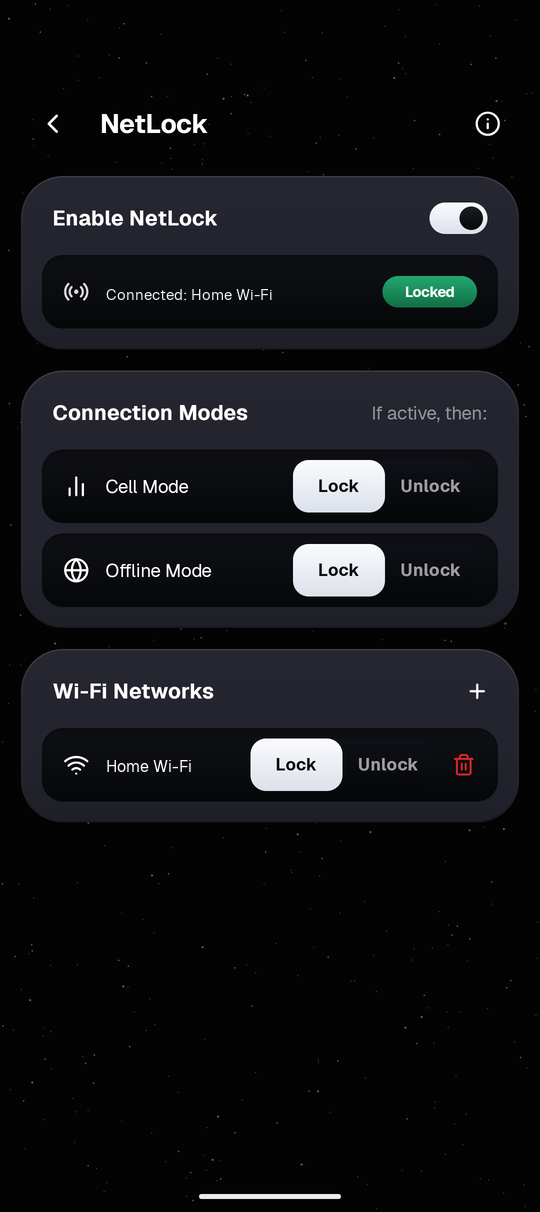
Home Locked
Cell Mode Lock Unlock
Offline Mode Lock Unlock
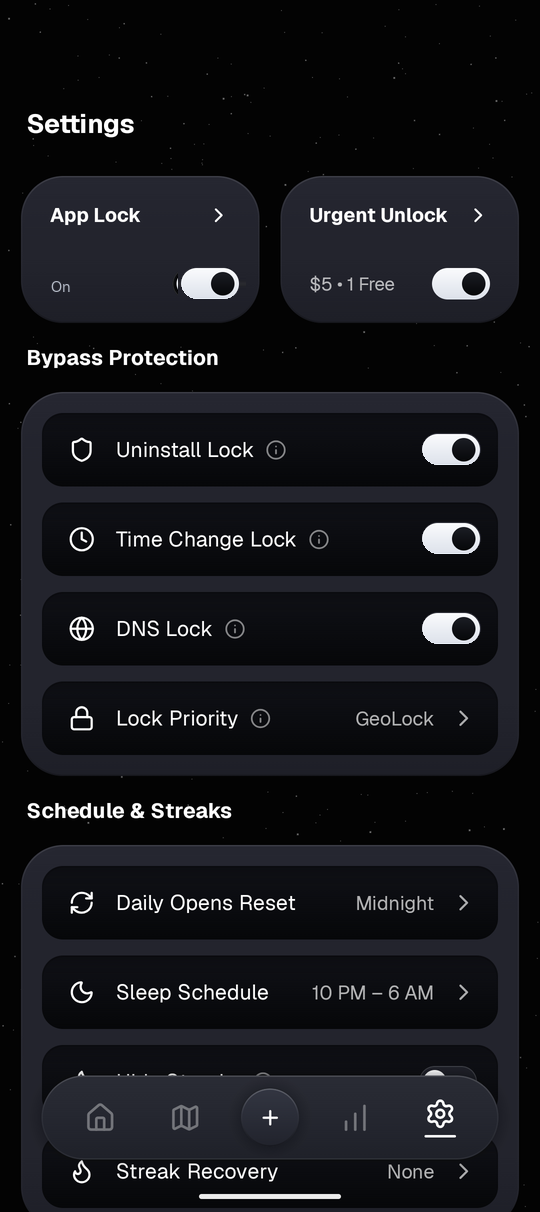
Uninstall Lock
Time Change Lock
DNS Lock
App Lock

Extra Settings Locks

Keep your rules steady late at night with optional uninstall, clock, DNS, and PIN passcode guards.

Work Hours & Sleep Schedule

See your daily rules across one 24-hour bar combining Limit, Strict, and Sleep hours.

12 AM 6 AM 12 PM 6 PM 12 AM
Limit Strict Sleep
Sleep Schedule 10 PM - 6 AM
1-Minute Closing Warning
Urgent Unlock Pass 1 Free Weekly
Rules, Counts & Hashed PIN 100% Local Only
Urgent Unlock Fee $5.00

Urgent Unlock & Privacy

One free 3-hour backup pass each week for real emergencies. All rules stay on your phone.

See Every Screen Inside VOID

Explore how daily app groups, 24-hour schedules, map zones, Wi-Fi rules, and usage stats work together on Android.
VOID live blocking pause screen on Instagram
Pause Before Opening
Stops habit taps for 8s so you decide
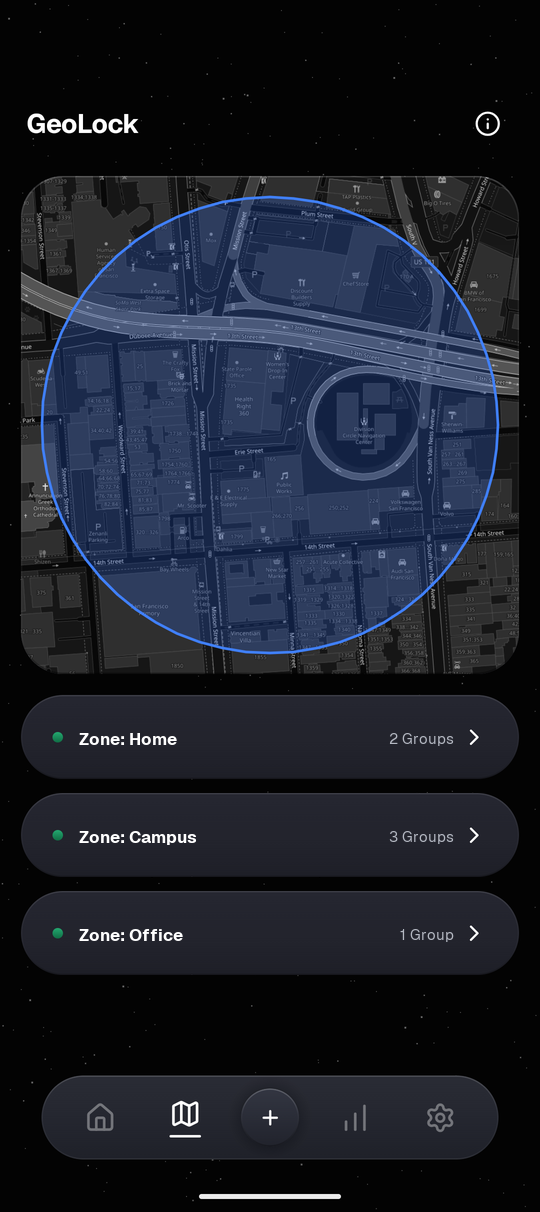
VOID GeoLock zones for Home, Campus, and Office on a dark map
Active Location Zone
Configured Home, Campus, and Office zones
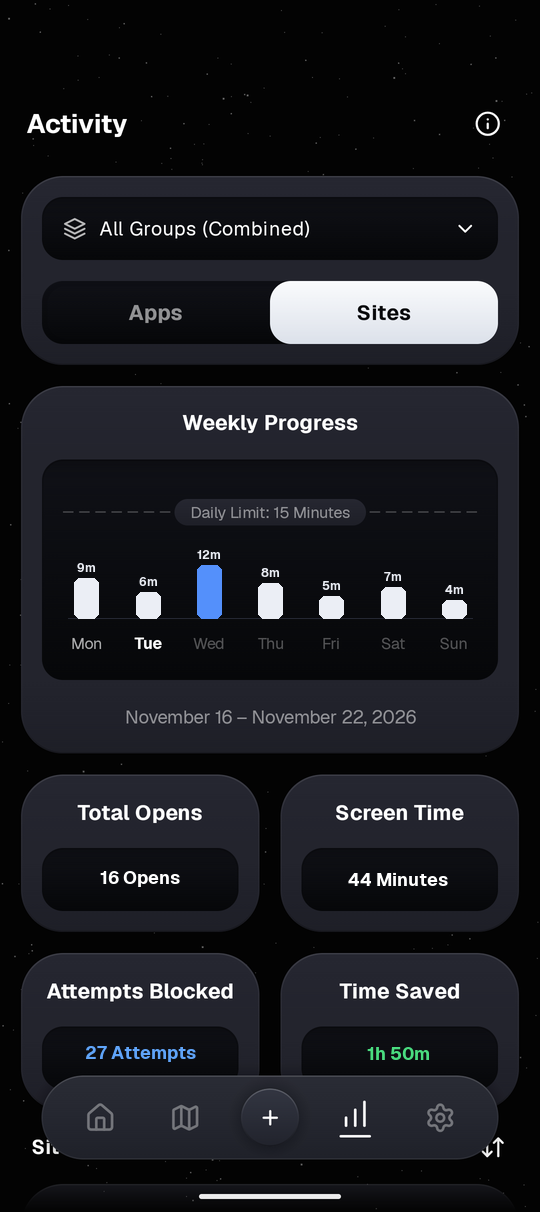
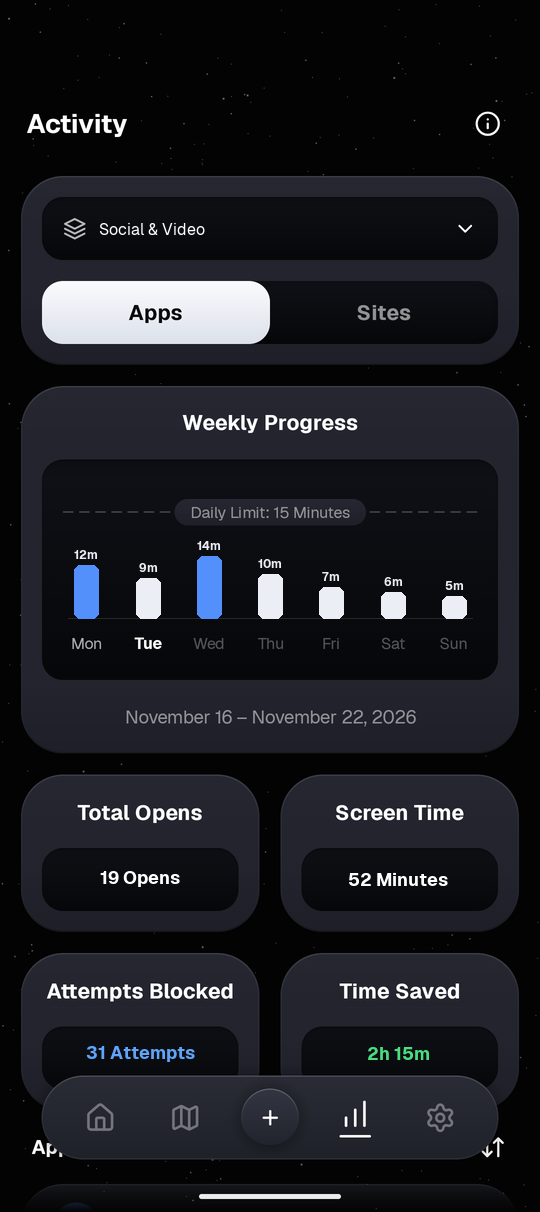
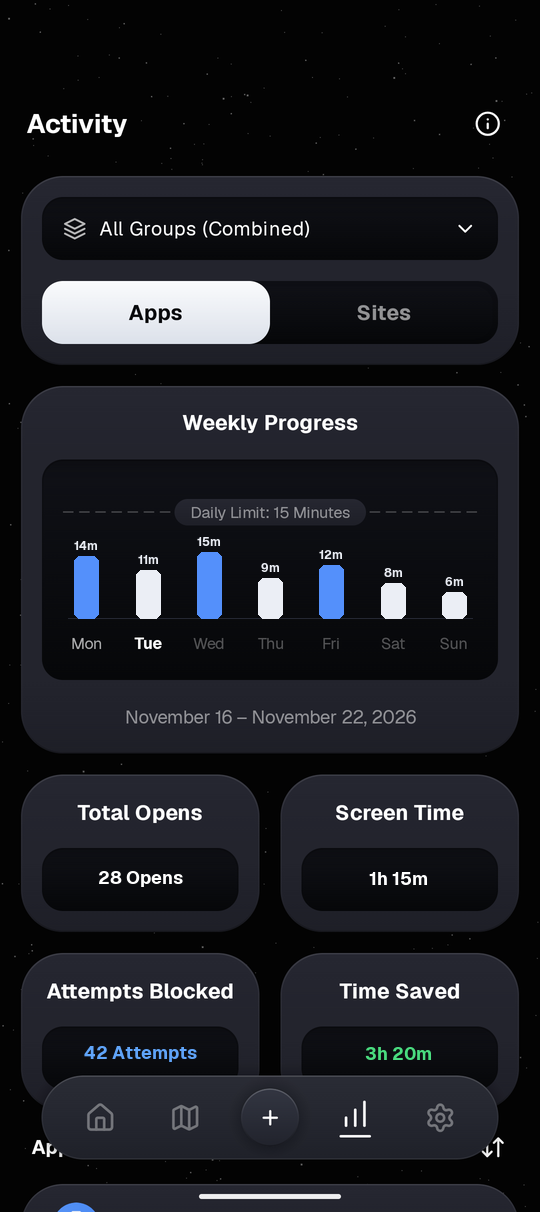
VOID Weekly Activity stats showing opens and minutes
Weekly Activity
Opens & daily screen time vs your limit
VOID Settings with App Lock, Urgent Unlock, and Bypass Protection
Healthy Permission State
App Lock, Urgent Unlock & Uninstall guards
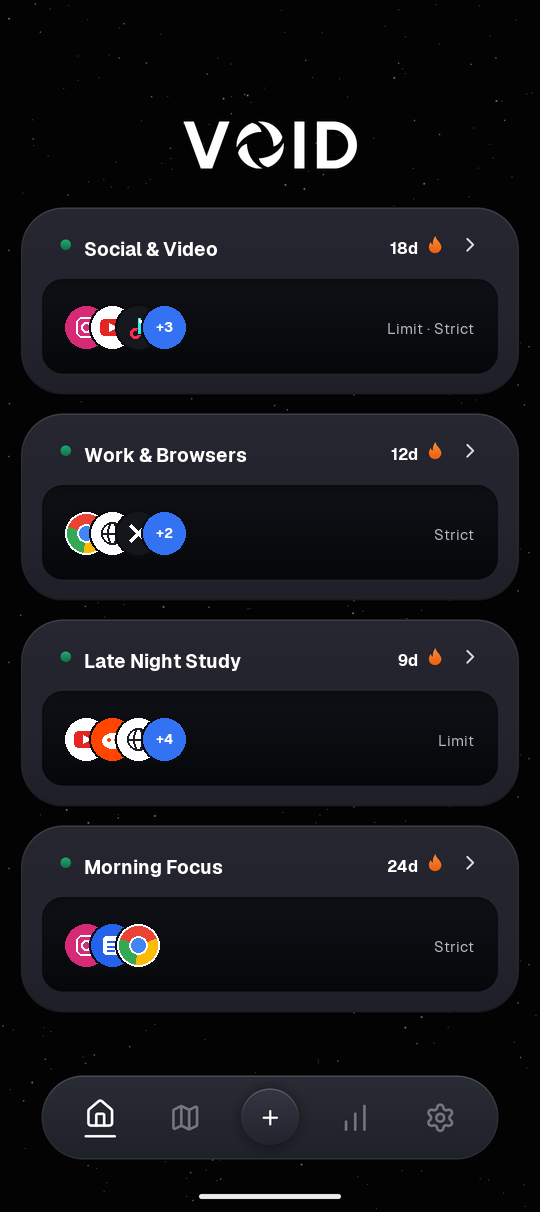
VOID Home Dashboard showing active block groups
Home Dashboard
All active rule groups in one clean view
VOID NetLock Wi-Fi and Cellular rules screen
Wi-Fi & Data Rules
Lock or unlock automatically by network
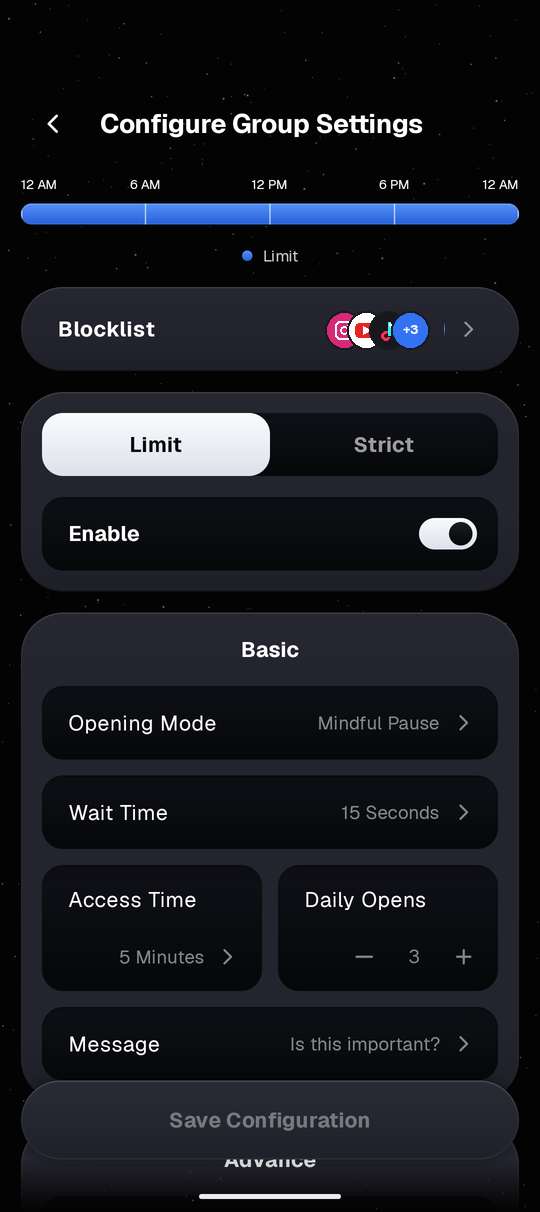
VOID Configure Group Settings screen
Flexible Group Setup
Switch Limit or Strict and pause timers
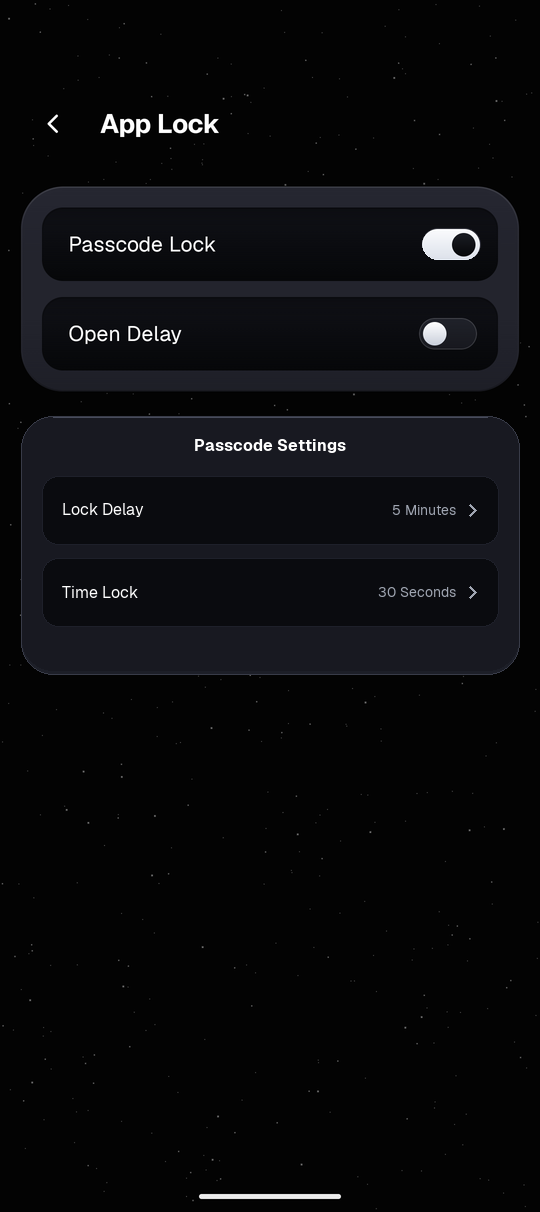
VOID App Lock Passcode and Delay settings screen
App Lock
Protect rule edits behind a PIN or delay
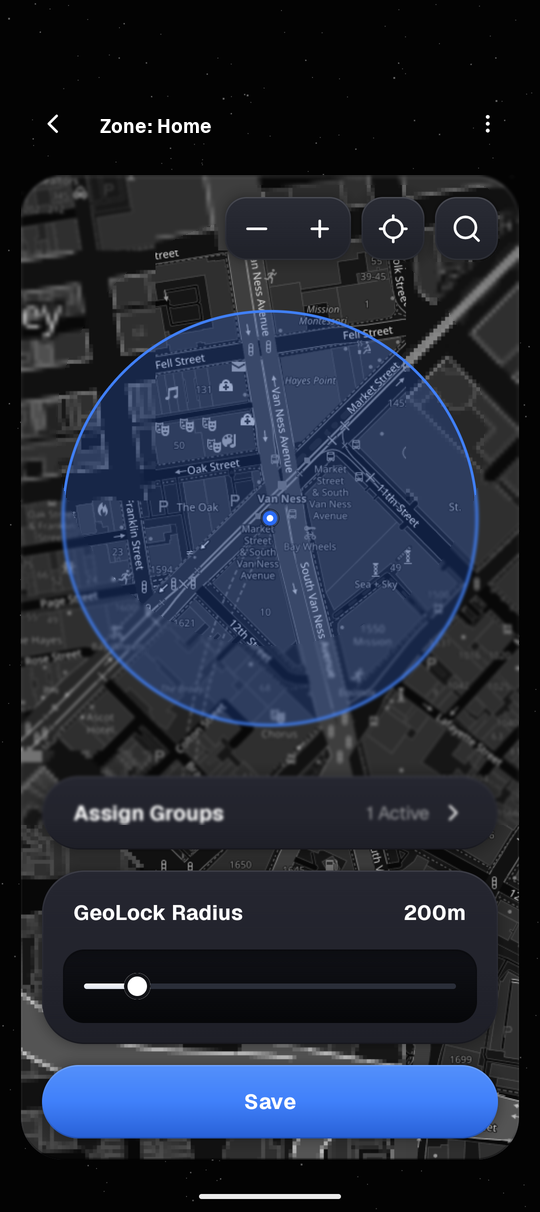
VOID GeoLock Zone setup with 200m radius slider
Zone Radius Picker
Adjust 30m to 1500m protection circles
VOID Website Activity breakdown screen
Browser Site Stats
Track blocked website domains beside apps
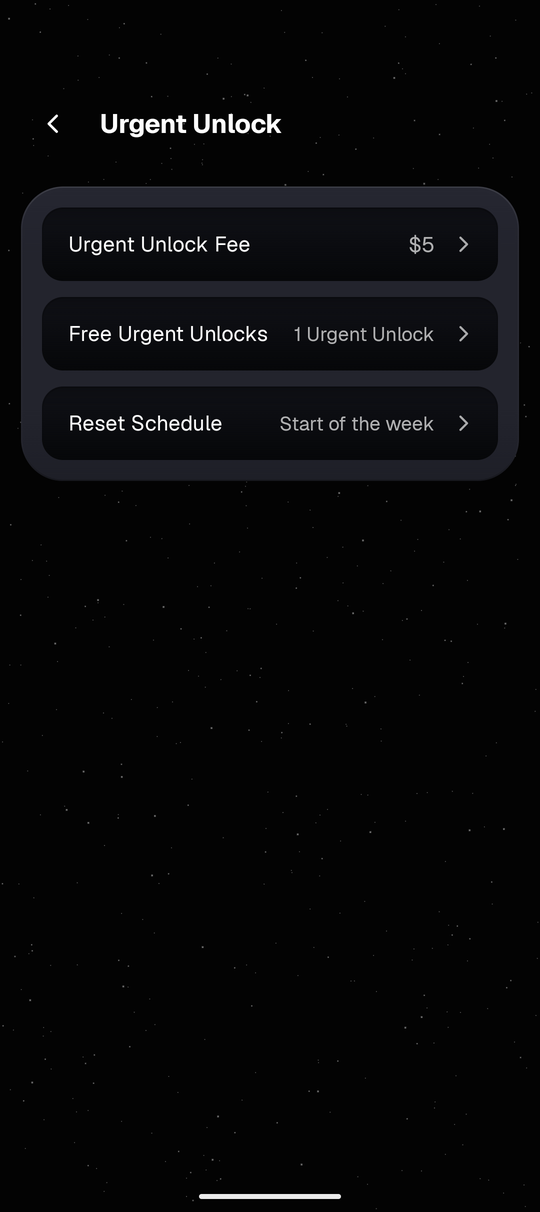
VOID Urgent Unlock backup pass settings screen
Urgent Unlock Pass
Configure your weekly 3-hour backup pass
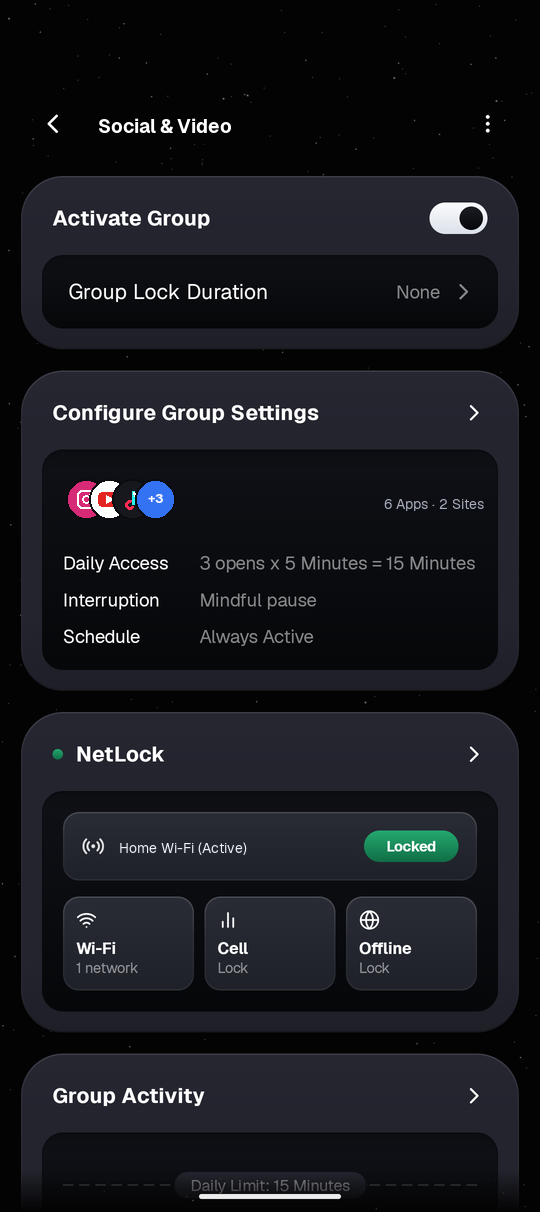
VOID Group Detail card overview screen
Group Rule Overview
Daily opens, NetLock & schedule summary
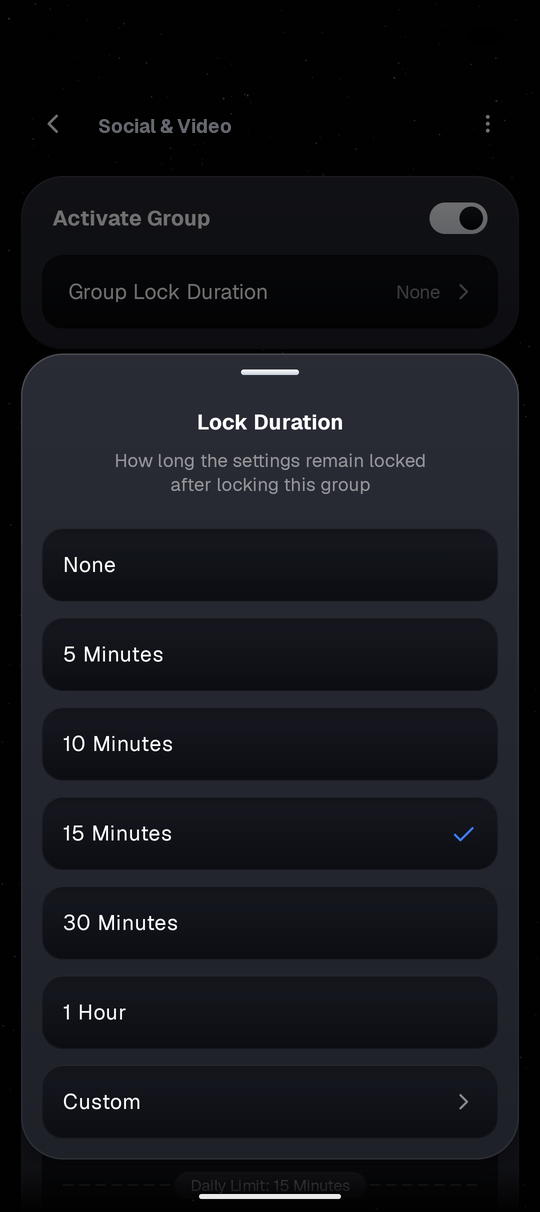
VOID Group Lock Duration selector sheet
Timed Rule Lock
Keep edits frozen for 15 min to custom hours
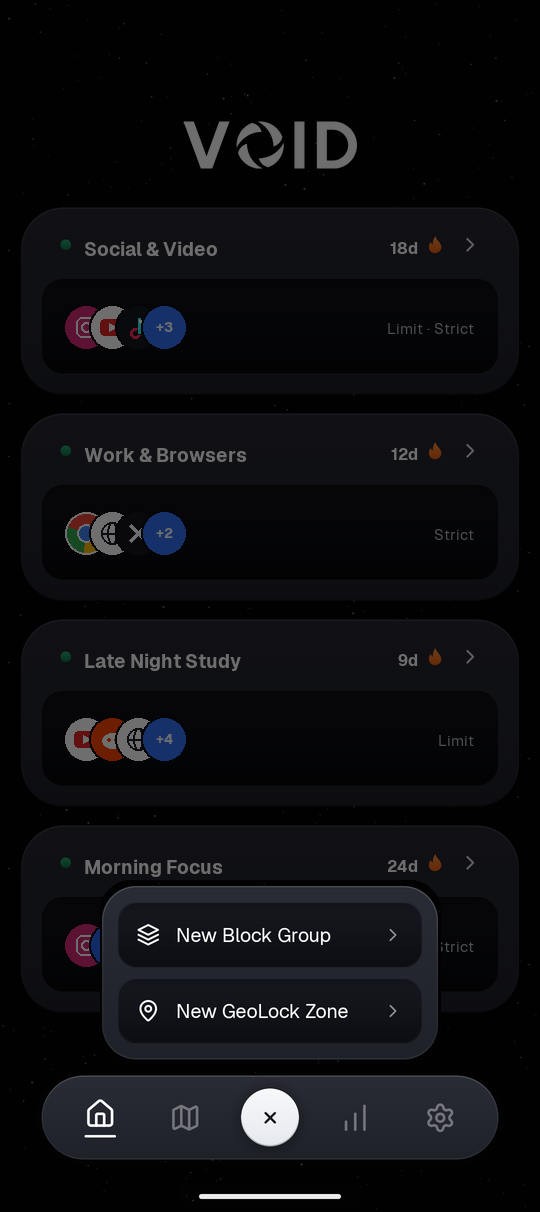
VOID Quick Create action sheet
Quick Create Sheet
Start a new app group or zone in two taps
VOID Single Group Activity breakdown screen
Group Check-In
Inspect one rule group's weekly history
VOID Bypass Protection and Sleep Schedule settings screen
Guards & Bedtime
Uninstall protection, clock lock & sleep hours

How VOID Compares

Where VOID fits alongside built-in Android controls and typical blockers.

What Matters Most VOID Google Wellbeing Typical Blockers
Slows you down first
Checks before loading feeds
4 Optional Pause Steps
Wait countdown, stillness, photo, or typing
~Dashboard & app timer, pause dialog varies
~Usually hard block or timer countdown
Blocks websites too
Shared app & browser groups
Apps & Sites Shared
One rule covers the app & matching domain
~App timers primary; separate Chrome site timers
~Website support varies by app tier
Location & Wi-Fi locks
Automatic rules by place
GeoLock + NetLock
Map zones (30m to 1,500m) & saved Wi-Fi triggers
×Schedule-based Focus mode only
~Found mostly in paid plans
Extra settings protection
Helps rules stay put
4 Optional Guards
Uninstall, clock, DNS & hashed PIN lock
×No PIN lock inside Digital Wellbeing
~Strict lock options vary by blocker
Account & setup
How personal rules are stored
No Sign-In Needed
Rules stay on phone; zero ads
~Tied to Google Android system profile
~Free tiers often require cloud sign-in or subscriptions

Get More Access with Void Pro

Start free with zero ads, or unlock every control with Void Pro.

Void Free

Block your top daily distractions for free.

$0
  • 1 Block Group with up to 5 Apps & 5 Websites
  • Limit Mode with Mindful Pause countdown
  • 1 Schedule Window + Editable Sleep Schedule
  • Uninstall Lock, Time Change Lock & DNS Lock
  • Current-Week Stats + 1 Free Weekly Urgent Pass

Void Pro

$4.99/mo · $29.99/yr · $79.99 Lifetime

$4.99
  • Unlimited Block Groups, Apps & Website Domains
  • Strict Mode + Multi-Window 24-Hour Schedules
  • Stillness Pause, Image Match & Mindful Typing
  • GeoLock Map Zones & NetLock Wi-Fi Rules
  • App Lock (6-Digit PIN, Biometrics, Time Lock) & History
  • 7-Day Free Trial available on the Yearly plan

Daily Screen Time Calculator

6.5 hrs/day
26 yrs
7.0 yrs
Spent so far on phone
At 6.5 hrs/day avg over your 26 years
14.6 yrs
Future time until age 80
Full years spent on your phone over the next 54 years
21.6 yrs
Total time lost to phone
7.0 yrs spent + 14.6 yrs ahead (to age 80)

Try VOID on Your Phone

Start with one or two apps you check too often at night. Put a 5-second pause before they open, with no account needed and zero ads.

Phone Needed Android 8.0 or newer
Account No sign-in needed
Privacy & Blocking Zero ads, local rules

Frequently Asked Questions

Straightforward answers about permissions, privacy, and rules.

No matching quick answers here. Search all detailed topics in the Help Center FAQ below.

Start With One App Today

You don't need strict lockouts or location rules on day one. Install VOID on Android, add a 5-second pause to the app you open most, and adjust as you go.

1. Installing VOID, Permissions & First Rule

Install VOID on Android (Android 8.0 or newer), finish onboarding to grant the basic permissions, and start with one group on the app that distracts you most. You can begin with a short Mindful Pause countdown before adding schedules or stricter locks later.

Required Onboarding Permissions

  • Usage Access: Tracks screen time across apps for Activity charts and enforces daily minutes and open limits.
  • Display Over Apps: Displays the full-screen blocking overlay over protected apps and optional floating countdown timer.
  • Accessibility Service: Detects foreground app switches, active browser domains for website rules, and enabled Settings bypass locks.

Optional Permissions (Enabled Only When Used)

  • Location (Including Background Location): Requested only if you enable GeoLock spatial zones (30m to 1,500m).
  • Camera: Requested only if you set an anchor photo for the Image Match challenge.
  • Wi-Fi & Network State / Biometrics / Battery Exemption / Notifications: Powers NetLock rules, fingerprint Settings unlock, session countdown alerts, and protection across reboots.
Local Storage + Map/Billing Scope: All blocking rules, usage stats, streak counts, and Image Match reference images stay locally on your phone (with Android cloud backup disabled). GeoLock address search checks Android's built-in on-device geocoder first and falls back to Nominatim only if needed. Network requests occur only if you load OpenStreetMap tiles (attributed on-map to © OpenStreetMap contributors) or fallback Nominatim searches inside GeoLock setup, or confirm optional Void Pro, Urgent Unlock, or Streak Recovery actions via Google Play Billing.

2. Modes, Website Domains & Protection Scope

Limit, Strict, or Both

Every group supports Limit (controlled daily opens and/or daily screen-time minutes), Strict (immediate block whenever active), or scheduled windows switching between them across a 24-hour bar. When a group enforces a Limit, choose what happens after your allowance finishes (Daily Opens, Daily Screen Time, or pause prompt).

Website Blocking Across Browsers

Add website domains like instagram.com or youtube.com inside any rule group alongside mobile apps. VOID inspects installed Android browser apps (Chrome, Samsung Internet, Firefox, Edge, Brave, Opera, and other installed browsers) to track live site sessions consistently.

Group vs. Per-App Protection Scope

Pick Group scope so every app and website in that rule shares one daily pool of opens/minutes, or Per-App scope to give each item its own independent counter.

3. The 4 Pause & Unlock Challenges

  • Mindful Pause: Countdown wait screen with an optional Increasing Delay setting that adds extra wait seconds each repeat time you open the app that day.
  • Stillness Pause: Uses motion sensors so you must keep your phone steady for the entire countdown duration before unlocking.
  • Image Match: Prompts you to point the camera at a local real-world anchor photo you saved earlier (for example, your desk, bookshelf, or outdoors).
  • Mindful Typing: Prompts you to type out a deliberate phrase word-for-word before the session opens.

Toggle Quick Opens in group settings for shorter utility unlocks inside your configured time allowance, and switch Unlock Button Location in Settings (Fixed or Random) to break automatic tap habits.

4. Schedules, Timer Display & Streaks

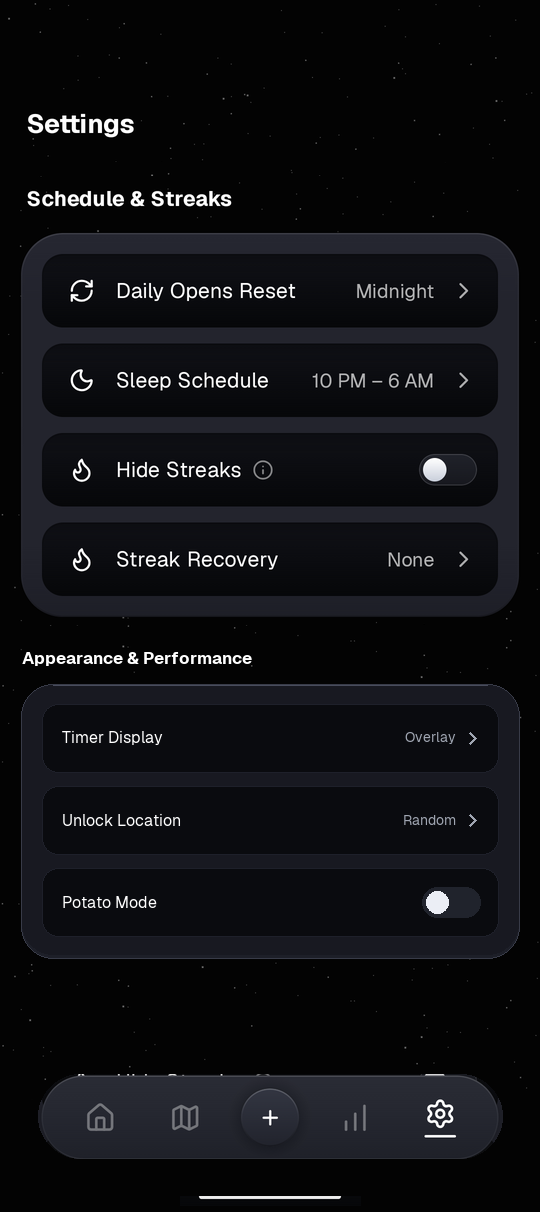
  • Daily Opens Reset: Choose whether counters reset at Midnight or a custom hour and minute in Settings.
  • Sleep Schedule: Configure quiet hours (e.g. 10 PM - 6 AM) aligned with your daily routine.
  • Timer Display: Show active unlocked session time either as a small movable Overlay bubble or a single silent Notification. VOID sends an alert when 1 minute remains.
  • Hide Streaks: Hide streak flame counters from Dashboard, Profile, and Activity in Settings while streak tracking continues quietly in the background.

5. GeoLock (30m-1500m) & NetLock Priority

GeoLock applies rules automatically around saved map boundaries adjustable from 30 meters up to 1,500 meters (1.5 km), triggering either Inside Area or Outside Area. NetLock activates rules based on saved Wi-Fi SSIDs, cellular data, or offline state.

When both GeoLock and NetLock apply to the same group, open Settings > Lock Priority to decide whether GeoLock overpowers NetLock or NetLock overpowers GeoLock.

6. Bypass Protection & App Lock

  • App Lock: Gate VOID Settings behind a 6-digit passcode (stored locally as a salted one-way protected hash) plus optional device Biometrics. Set lock delay (Immediately, 1 Minute, 5 Minutes, 10 Minutes, or 15 Minutes) and optional Time Lock waiting countdown (None, 15s, 30s, 1m, 2m, or 5m).
  • Uninstall Lock: Blocks opening VOID's Android App Info / Uninstall page and automatically cancels or dismisses system uninstall, force-stop, and Accessibility-disable prompts on your behalf while enabled. If you forget your 6-digit App Lock passcode while Uninstall Lock is active, the Urgent Unlock recovery shield stays accessible on both the App Lock screen and the protection overlay so you are never locked out permanently.
  • Time Change Lock: Blocks system Date & Time settings so schedules cannot be skipped by changing the phone clock.
  • DNS Lock: Blocks access to Android Private DNS settings to prevent bypassing domain filters.

7. Urgent Unlock & Streak Recovery

Urgent Unlock lets you bypass blocked apps temporarily for a 3-hour window when genuine emergencies come up. You get 1 free Urgent Unlock pass that refreshes 7 days after it is consumed (always used first). Phone, Dialer, telecom, and built-in Emergency SOS apps are permanently excluded from blocking and never need Urgent Unlock.

Once your weekly free pass is used, you can unlock for 3 hours by paying your configured accountability fee ($5, $10, $15, $30, $50, or $100 via Google Play Billing; changing your chosen amount locks changes for 30 days). Broken group streaks can also be restored under Settings > Streak Recovery for a flat $4.99 fee via Google Play Billing.

8. Potato Mode, Recovery & Support

Animations feel heavy on an older phone: Switch on Potato Mode inside Settings > Appearance & Performance to turn off background starfield motion and visual animations across VOID.

Protection stopped after reboot or OS update: Android OEM battery managers or Accessibility updates may pause background monitoring. Reopen VOID, tap the permission banner at the top of the screen, and confirm Accessibility and battery optimization exemption. You can also view open-source and map license notices anytime inside Settings > Support > Open Source Licenses. Need help? Use Settings > Report a Bug or write to [email protected].